20 Expert Online Safety Tips: The Complete Guide to Protecting Your Digital Life

(Introduction)
The internet has become an essential part of modern life. People use digital platforms every day for communication, education, shopping, banking, entertainment, and professional work. While the internet provides countless opportunities, it also creates risks that can affect personal privacy, financial security, and emotional well-being.
This is where online safety becomes important.
Online safety refers to the practices, tools, and habits that help individuals protect themselves while using the internet. It includes protecting personal information, avoiding online scams, securing accounts, understanding digital threats, and making responsible decisions online.
As technology continues to grow, cybercriminals and online threats are also becoming more advanced. From identity theft and phishing attacks to malware and privacy violations, users must understand how to stay protected in the digital environment.
Whether you are a student, parent, business owner, employee, or everyday internet user, learning about online safety can help you create a safer and more positive online experience.
What Is Online Safety?
Online safety is the process of protecting yourself, your data, and your digital identity while using the internet. It involves understanding potential dangers and following safe practices to reduce online risks.
Many people believe that cyber threats only target large companies or government organizations, but individuals are often common targets. Hackers may attempt to steal passwords, financial information, personal details, or access private accounts.
Online safety covers several important areas, including:
- Personal data protection
- Password security
- Safe browsing habits
- Social media privacy
- Online communication safety
- Protection against scams
- Device security
- Digital awareness
By practicing good online safety habits, users can reduce the chances of becoming victims of cybercrime.
Why Is Online Safety Important?
The internet connects billions of people worldwide, but this connection also creates opportunities for misuse. Personal information shared online can sometimes be collected, stolen, or used without permission.
Online safety is important because it helps protect:
1. Personal Information
Personal information includes details such as:
- Full name
- Home address
- Phone number
- Email address
- Date of birth
- Identification details
Cybercriminals may use stolen information for fraud, identity theft, or unauthorized access to accounts.
Keeping personal information private is one of the most important parts of online safety.
2. Financial Security
Online banking, digital payments, and online shopping have made financial transactions easier than ever. However, they have also created new risks.
Scammers may create fake websites, send fraudulent emails, or use social engineering techniques to trick users into sharing financial information.
Following online safety practices can help protect your money and financial accounts.
3. Digital Identity Protection
Your online identity represents how you appear on the internet. It includes your social media profiles, usernames, photos, posts, and digital activities.
A damaged digital identity can affect personal relationships, education opportunities, and professional careers.
Maintaining a positive and secure online presence is an important part of digital responsibility.
Common Online Safety Threats
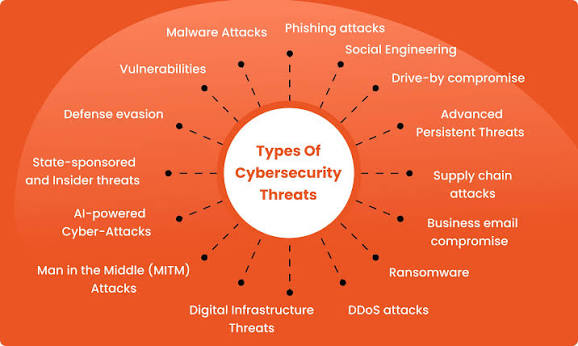
Understanding common online threats is the first step toward protection.
Phishing Attacks
Phishing is one of the most common online threats. It involves fake emails, messages, or websites designed to trick people into revealing sensitive information.
A phishing message may pretend to come from:
- A bank
- A social media platform
- A delivery company
- A government service
- A trusted organization
These messages often create urgency by claiming that immediate action is required.
Examples include:
“Your account will be closed unless you verify your information.”
“You have won a prize. Click here to claim it.”
To stay safe, always verify the sender and avoid clicking suspicious links.
Malware and Viruses
Malware is harmful software designed to damage devices, steal information, or gain unauthorized access.
Common types of malware include:
- Viruses
- Spyware
- Ransomware
- Trojans
- Adware
Malware can enter devices through:
- Unsafe downloads
- Suspicious email attachments
- Fake applications
- Infected websites
Using security software and downloading files only from trusted sources can reduce risks.
Weak Passwords
Passwords are one of the first lines of defense for online accounts. However, many users still create weak passwords that are easy to guess.
Common weak passwords include:
- Simple number combinations
- Names
- Birth dates
- Common words
A strong password should include:
- Uppercase letters
- Lowercase letters
- Numbers
- Special characters
- A unique combination
Using different passwords for different accounts is also an important online safety practice.
Identity Theft
Identity theft occurs when someone steals personal information and uses it for illegal purposes.
Criminals may use stolen identities to:
- Open fake accounts
- Make unauthorized purchases
- Access private information
- Commit financial fraud
Protecting personal data and monitoring accounts regularly can help prevent identity theft.
Creating Strong Passwords for Better Online Safety
A strong password is essential for protecting digital accounts.
A good password should:
- Be long and unique
- Avoid personal information
- Not be reused across multiple accounts
- Be difficult for others to guess
Instead of using simple passwords, users can create passphrases that combine multiple words.
For example, a memorable sentence can be transformed into a stronger password by adding numbers and symbols.
Another useful security method is using a password manager. Password managers help users create and store secure passwords without needing to remember every password individually.
The Role of Two-Factor Authentication in Online Safety
Two-factor authentication (2FA) adds an extra layer of protection to online accounts.
With 2FA enabled, users need two forms of verification before accessing an account.
Examples include:
- Password + verification code
- Password + fingerprint
- Password + security key
Even if someone discovers your password, they may still be unable to access your account without the second verification method.
Many online services now offer two-factor authentication as a security option.
Safe Browsing Habits
Safe browsing is an important part of online safety.
Users should:
- Check website addresses before entering information
- Avoid suspicious pop-ups
- Do not download unknown files
- Keep browsers updated
- Avoid entering passwords on unsecured websites
Secure websites usually use HTTPS and display a security symbol in the browser address bar.
Frequently Asked Questions (FAQs) About Online Safety
1. What is online safety?
Online safety refers to the practices and precautions people follow to protect themselves, their personal information, devices, and digital identity while using the internet. It includes safe browsing, strong passwords, privacy protection, and avoiding online scams.
2. Why is online safety important?
Online safety is important because it helps protect users from cyber threats such as hacking, identity theft, phishing scams, malware, and privacy breaches. Safe online habits allow people to use the internet with greater confidence and security.
3. What are the most common online safety risks?
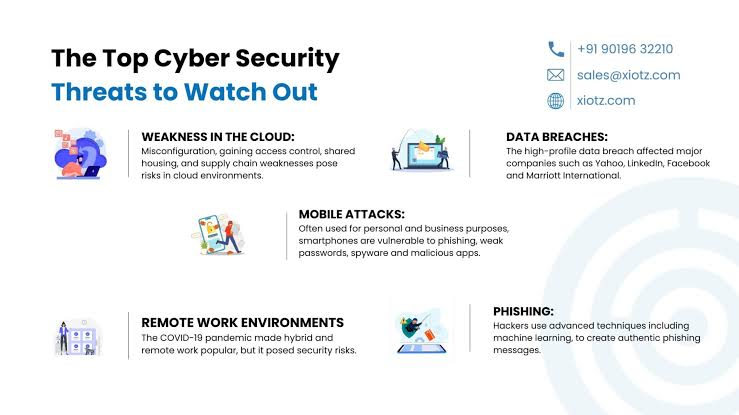
Some common online safety risks include:
- Phishing emails and fake websites
- Weak or stolen passwords
- Malware and viruses
- Identity theft
- Online scams
- Privacy violations
- Cyberbullying
- Unsafe downloads
Understanding these risks can help users avoid becoming victims of cybercrime.
4. How can I protect my personal information online?
You can protect your personal information by:
- Avoiding sharing unnecessary details online
- Using privacy settings on social media accounts
- Creating strong passwords
- Enabling two-factor authentication
- Avoiding suspicious links and messages
- Using secure websites when entering sensitive information
5. What makes a password strong?
A strong password is long, unique, and difficult to guess. It should include a combination of uppercase letters, lowercase letters, numbers, and special characters.
Avoid using common passwords, names, birthdays, or the same password for multiple accounts.
6. What is two-factor authentication?
Two-factor authentication (2FA) is a security feature that requires two types of verification before allowing access to an account.
For example, after entering your password, you may need to enter a code sent to your phone or confirm your identity through an authentication app.
7. How can I identify a phishing scam?
You can identify phishing scams by looking for warning signs such as:
- Unknown senders
- Urgent requests for personal information
- Suspicious links
- Spelling mistakes
- Offers that seem too good to be true
Always verify messages before clicking links or sharing information.
8. How can I stay safe on social media?
To improve social media safety:
- Keep your accounts private when possible
- Avoid sharing sensitive personal details
- Accept requests only from people you know
- Use strong passwords
- Enable security features
- Think before posting content
9. Is public Wi-Fi safe to use?
Public Wi-Fi can be risky because some networks may not have strong security. Avoid accessing sensitive accounts, such as online banking, while connected to unsecured public networks.
Using a trusted network or a secure connection can improve your online safety.
10. How can parents keep children safe online?
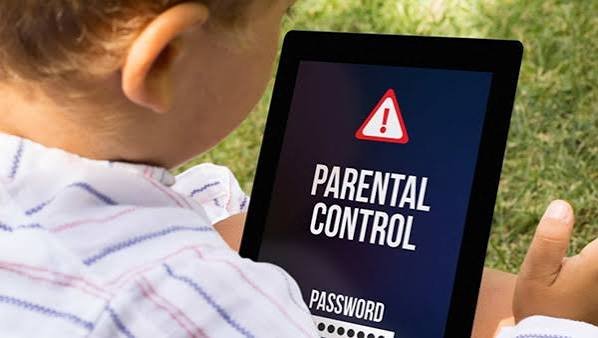
Parents can help children stay safe online by:
- Teaching them about internet risks
- Setting appropriate privacy controls
- Monitoring online activities
- Encouraging open communication
- Teaching children not to share personal information
Helping children develop responsible digital habits is an important part of online safety.
Conclusion
Online safety is no longer optional in today’s digital world. As internet usage continues to increase, understanding online risks and practicing safe digital habits has become essential.
Protecting personal information, creating strong passwords, recognizing scams, and maintaining privacy are simple steps that can make a major difference.
A safer internet experience begins with awareness, responsibility, and smart online decisions.