
In today’s digital economy, small businesses rely heavily on technology to manage daily operations, communicate with customers, process payments, and store important data. While these tools improve efficiency and productivity, they also make businesses attractive targets for cybercriminals.
Many small business owners believe hackers only target large corporations. In reality, small businesses are often seen as easier targets because they may have fewer security resources and less formal cybersecurity policies. A single cyberattack can lead to financial losses, data breaches, operational downtime, and damage to a company’s reputation.
The good news is that protecting your business doesn’t always require expensive security systems. By following a few essential cybersecurity practices, small business owners can significantly reduce their risk of cyber threats.
Why Cybersecurity Matters for Small Businesses
Small businesses often store valuable information such as:
- Customer names and contact details
- Payment information
- Employee records
- Financial documents
- Business contracts
- Login credentials
- Intellectual property
If this information falls into the wrong hands, the consequences can include identity theft, legal issues, loss of customer trust, and significant financial damage.
Cybersecurity should be viewed as an investment in your business’s long-term success rather than an optional expense.
Common Cyber Threats Facing Small Businesses
Understanding common threats is the first step toward building better security.
Some of the most frequent cyber threats include:
- Phishing attacks
- Ransomware
- Malware infections
- Business email compromise (BEC)
- Password theft
- Insider threats
- Data breaches
- Fake invoices and payment fraud
Knowing what you’re protecting against makes it easier to implement effective security measures.
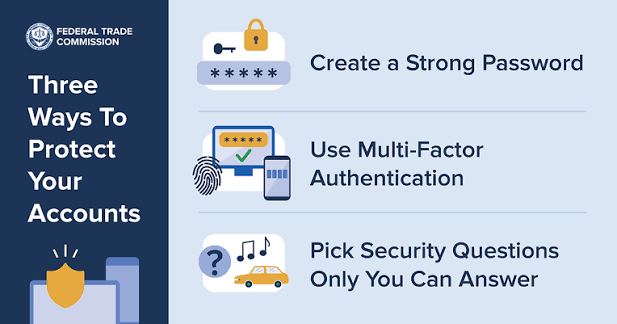
1. Use Strong Passwords and Password Managers
Weak passwords remain one of the easiest ways for hackers to gain access to business accounts.
Encourage employees to:
- Create passwords that are at least 12–16 characters long.
- Use a combination of letters, numbers, and symbols.
- Avoid reusing passwords across accounts.
- Never share passwords through email or messaging apps.
Using a password manager helps employees generate and securely store unique passwords for every account.
2. Enable Multi-Factor Authentication (MFA)
Multi-factor authentication adds an extra layer of security beyond passwords.
Even if a password is stolen, hackers still need the second verification step to access the account.
Enable MFA for:
- Business email accounts
- Cloud storage
- Accounting software
- Customer management systems (CRM)
- Banking platforms
- Remote access tools
Authentication apps or security keys are generally more secure than SMS-based verification.
3. Keep Software and Devices Updated
Outdated software often contains security vulnerabilities that cybercriminals actively exploit.
Regularly update:
- Operating systems
- Business applications
- Web browsers
- Antivirus software
- Firewalls
- Routers
- Mobile devices
Enable automatic updates whenever possible to ensure critical security patches are installed promptly.
4. Train Employees to Recognize Cyber Threats
Employees are often the first line of defense against cyberattacks.
Provide regular cybersecurity awareness training covering topics such as:
- Recognizing phishing emails
- Safe internet browsing
- Password security
- Social engineering tactics
- Safe file sharing
- Reporting suspicious activity
Even brief training sessions can dramatically reduce the risk of successful attacks.
5. Back Up Business Data Regularly
Data loss can occur because of ransomware, hardware failures, accidental deletion, or natural disasters.
Follow the 3-2-1 backup strategy:
- Keep three copies of your data.
- Store them on two different storage types.
- Keep one backup offsite or in secure cloud storage.
Test your backups regularly to ensure they can be restored successfully.
6. Install Reliable Security Software
Every business device should have trusted security software installed.
This includes:
- Antivirus protection
- Anti-malware software
- Firewall protection
- Email security tools
- Endpoint detection solutions
Keep security software updated so it can recognize the latest threats.
7. Secure Your Business Wi-Fi Network
An unsecured wireless network can provide attackers with direct access to your business systems.
Improve Wi-Fi security by:
- Using WPA3 or WPA2 encryption.
- Changing the default router password.
- Creating a separate guest Wi-Fi network.
- Disabling remote router management unless required.
- Regularly updating router firmware.
A secure network helps protect both business operations and customer information.
8. Limit Access to Sensitive Information
Not every employee needs access to every system.
Use the principle of least privilege, meaning employees receive access only to the information necessary for their job responsibilities.
Regularly:
- Review user accounts.
- Remove access for former employees.
- Disable unused accounts.
- Monitor administrator privileges.
Limiting access reduces the potential impact of compromised accounts.
9. Watch Out for Phishing Attacks
Phishing remains one of the most common methods cybercriminals use to target businesses.
Employees should be cautious of:
- Unexpected invoices
- Fake password reset requests
- Urgent payment demands
- Suspicious attachments
- Unknown links
Encourage employees to verify unusual requests through a separate communication method before taking action.
10. Develop a Cybersecurity Policy
Every business, regardless of size, should have clear cybersecurity guidelines.
Your policy should include:
- Password requirements
- Acceptable internet usage
- Device security rules
- Data handling procedures
- Incident reporting steps
- Backup schedules
- Remote work security practices
Having written policies helps employees understand their responsibilities and promotes consistent security practices.
11. Secure Remote Work Environments
Many small businesses now support remote or hybrid work, making remote security more important than ever.
Protect remote workers by:
- Requiring VPN access when connecting to company systems.
- Enabling MFA for remote logins.
- Keeping home devices updated.
- Using company-approved software.
- Avoiding public Wi-Fi for sensitive work.
Remote work security should be part of your overall cybersecurity strategy.
12. Create an Incident Response Plan
Despite your best efforts, no security system is perfect.
Prepare for potential incidents by creating a response plan that outlines:
- Who to contact during a cyberattack
- How to isolate affected systems
- Backup recovery procedures
- Customer communication plans
- Reporting requirements
A well-prepared response can reduce downtime and minimize damage.
Common Cybersecurity Mistakes Small Businesses Make
Many cyber incidents happen because of avoidable mistakes, including:
- Reusing passwords
- Ignoring software updates
- Failing to back up important data
- Not training employees
- Using unsecured Wi-Fi networks
- Sharing user accounts
- Allowing unrestricted access to sensitive systems
- Delaying security improvements after a warning
Recognizing these common mistakes is the first step toward building a stronger security posture.
Everyday Cybersecurity Best Practices
Encourage these habits throughout your organization:
- Lock computers when leaving workstations.
- Verify unexpected requests for payments or sensitive information.
- Report suspicious emails immediately.
- Regularly monitor financial accounts and business systems.
- Remove unused software and applications.
- Review security settings on cloud services.
Consistent daily habits can significantly reduce cybersecurity risks.

Final Thoughts
Cybersecurity is no longer just an IT concern—it’s a business necessity. Small businesses are increasingly targeted by cybercriminals because they often have valuable data but limited security resources. Fortunately, many cyber threats can be prevented through awareness, planning, and simple security practices.
By using strong passwords, enabling multi-factor authentication, keeping software updated, training employees, backing up critical data, securing your network, and preparing for potential incidents, you can greatly reduce the risk of cyberattacks.
Protecting your business isn’t about implementing every possible security tool overnight. It’s about building a culture of cybersecurity where every employee understands their role in keeping the business, its customers, and its data safe. Small, consistent improvements today can prevent costly security incidents in the future.