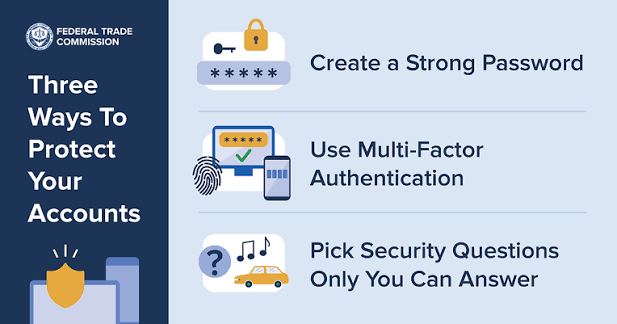

Passwords are the keys to your digital life. They protect your email, bank accounts, social media profiles, online shopping accounts, and even your work-related information. Unfortunately, weak passwords remain one of the biggest reasons cybercriminals successfully gain access to personal and business accounts.
Many people still use easy-to-guess passwords or reuse the same password across multiple websites. While these habits may seem convenient, they can leave your sensitive information vulnerable to hackers. The good news is that creating stronger passwords doesn’t have to be difficult. By following a few simple practices, you can significantly improve your online security.
In this article, we’ll explore practical and easy ways to make your passwords more secure and keep your accounts better protected.
Why Strong Passwords Matter
Every online account contains valuable information. If a hacker gains access to just one of your accounts, they may be able to steal personal data, reset passwords for other services, or even access your financial information.
Weak passwords are often cracked using automated tools that can test millions of password combinations in seconds. A strong password creates a much larger barrier, making it far more difficult for attackers to break into your accounts.
1. Create Long Passwords
One of the simplest ways to improve password security is to make your passwords longer. Longer passwords are generally much harder for hackers to crack than short ones.
Aim for passwords that are at least 12 to 16 characters long. The more characters your password contains, the more secure it becomes.
For example:
- Weak:
Summer23 - Strong:
SunnyRiver!Coffee2026
Long passwords provide better protection against brute-force attacks, where hackers repeatedly guess passwords until they find the correct one.
2. Use a Mix of Characters
A secure password should include a variety of character types, such as:
- Uppercase letters (A–Z)
- Lowercase letters (a–z)
- Numbers (0–9)
- Special characters (!, @, #, $, %, &, *)
Using different character types makes passwords more complex and much harder to guess.
Instead of using predictable patterns like:
Password123
Try something more unique, such as:
Green!Mountain48&Sky
3. Avoid Personal Information
Many people create passwords using information that’s easy to find online, including:
- Birthdays
- Phone numbers
- Pet names
- Children’s names
- Favorite sports teams
- Home addresses
Cybercriminals often search social media profiles for these details before attempting to guess passwords.
Choose passwords that have no obvious connection to your personal life.
4. Never Reuse Passwords
Reusing the same password across multiple accounts is one of the biggest cybersecurity mistakes.
Imagine you use the same password for:
- Online banking
- Shopping websites
If one website experiences a data breach, hackers can try the same password on all your other accounts—a technique known as credential stuffing.
Using a unique password for every account helps prevent one compromised account from putting all your other accounts at risk.
5. Use Passphrases Instead of Single Words
A passphrase is a combination of several unrelated words that create a long, memorable password.
For example:
Coffee!RiverTigerSunset88PurpleApple!OceanBridge42
Passphrases are easier to remember than random strings of characters while still providing strong security.
Just avoid using famous quotes or common sayings, as attackers may test those first.
6. Turn On Multi-Factor Authentication (MFA)
Even the strongest password can sometimes be stolen through phishing attacks or data breaches.
That’s why enabling Multi-Factor Authentication (MFA) is one of the smartest security decisions you can make.
With MFA, you’ll need a second verification step, such as:
- A code from an authenticator app
- A fingerprint
- Facial recognition
- A security key
Even if someone learns your password, they still won’t be able to access your account without the second verification factor.
7. Use a Password Manager
Remembering dozens of unique passwords can be difficult.
A password manager solves this problem by:
- Generating strong passwords
- Storing them securely
- Automatically filling login information
- Alerting you about weak or reused passwords
Instead of memorizing every password, you only need to remember one strong master password.
8. Change Compromised Passwords Immediately
You don’t need to change your passwords every month if they’re already strong and unique. However, you should update them immediately if:
- A website reports a data breach
- You notice suspicious account activity
- Someone else may know your password
- You accidentally shared your password
Replacing compromised passwords quickly helps prevent unauthorized access.
9. Watch Out for Phishing Attacks
Some hackers don’t try to guess passwords—they simply trick people into giving them away.
Phishing emails often pretend to come from trusted organizations and ask you to:
- Verify your account
- Reset your password
- Confirm payment information
Before entering your password anywhere:
- Check the website address carefully.
- Avoid clicking links in unexpected emails.
- Visit websites directly by typing the address into your browser.
10. Never Share Your Passwords
No legitimate company will ask for your password through:
- Phone calls
- Text messages
- Social media
Keep your passwords private, even with friends or coworkers, unless it’s absolutely necessary and done through a secure method.
If multiple people need access to an account, consider using secure password-sharing features available in many password managers.
Common Password Mistakes to Avoid
Many password-related security problems can be prevented by avoiding these common mistakes:
- Using “123456” or “password”
- Reusing passwords across multiple accounts
- Writing passwords on sticky notes
- Saving passwords in unprotected documents
- Sharing passwords through email or messaging apps
- Ignoring security alerts after a data breach
- Using short or predictable passwords
Avoiding these habits can significantly strengthen your online security.
Quick Password Security Checklist
Before creating a new password, ask yourself:
- Is it at least 12–16 characters long?
- Does it include uppercase and lowercase letters?
- Does it contain numbers and special characters?
- Is it unique for this account?
- Does it avoid personal information?
- Is multi-factor authentication enabled?
If you answered “yes” to all of these questions, your account is much better protected.
Final Thoughts
Strong passwords are one of the simplest yet most effective ways to protect your online accounts. While no password can guarantee complete security, combining long, unique passwords with multi-factor authentication and good online habits makes it much harder for cybercriminals to gain access to your personal information.
Remember, cybersecurity begins with small daily decisions. Taking a few extra minutes to create secure passwords today can save you from identity theft, financial loss, and unnecessary stress in the future. By following these simple password security tips, you’ll be taking an important step toward keeping your digital life safe and secure.